

In a divestiture, an IT carve-out is the work of separating the sold business’s applications, data, infrastructure and IT services from its parent so it can run on its own. It is the reverse of buy-side integration, where two estates are combined, although many deals involve both.
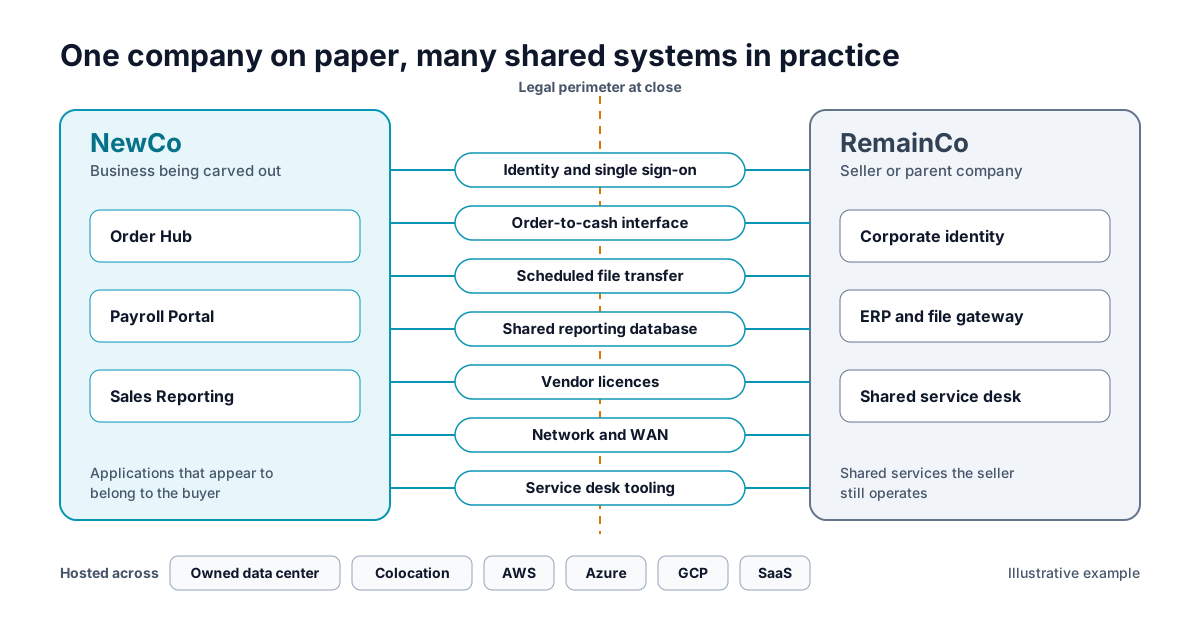
Take a hypothetical order processing application called Order Hub. It belongs to the business being sold, which we will call NewCo. Its users sign in through the parent company’s identity platform. Its database sits in a colocation facility the seller operates. Every night it sends a file to a pricing application in an AWS account that stays with the seller, which we will call RemainCo. When it breaks, the ticket goes to a service desk that is not part of the deal.
An application can belong to NewCo while its login, hosting and support remain with the seller. Record those dependencies before deciding what transfers at close and what needs temporary support under a Transition Services Agreement (TSA), the contract in which the seller keeps providing agreed services for a period after close.
Why does a CMDB or spreadsheet inventory fall short in a carve-out?
A CMDB or spreadsheet may already contain much of the required inventory. The challenge is verifying that information and connecting it to separation decisions. Application dependency mapping is usually where the gaps show up.
An inventory is sufficient only if the team can connect each application to its business owner, shared services and separation decision. A quick check: take one critical application and compare its record against its identity configuration, its interfaces and its support arrangements. Record the gaps and the conflicting evidence rather than treating an imported record as verified.
Those gaps matter most where the business cannot pause. Payroll, order-to-cash and regulatory reporting tend to rely on shared identity, shared data and shared support, and each gap is a question someone has to answer before the TSA ends. Gaps left open tend to surface as estimates that keep moving, TSA services held longer than planned and licences paid twice. The buyer needs those answers to decide what to take, rebuild or replace, and the seller needs them to know which services and costs it keeps.
What does a carve-out team need to know about every application?
This is the framework we use in this article, not an industry standard. Before a workstream claims readiness, it should be able to answer six questions for each application in scope and produce the output in the right-hand column.
| Question | What the team needs to know | Output |
|---|---|---|
| Perimeter | Which capabilities and applications belong to NewCo, RemainCo or both? | A scope decision |
| Dependencies | Which identity services, interfaces, shared data, third-party services, databases, servers, networks and support teams does it rely on? | Dependency evidence, with its source |
| Disposition | Transfer, clone and split, replace, retire, consolidate, or provide temporarily through a TSA? | A proposed disposition and the evidence behind it |
| Day 1 | What must work at close, and what can stay transitional with tested controls and a fallback? | Day 1 acceptance |
| TSA exit | Which technical and commercial steps release each seller-provided service, by when, and who accepts it? | Service exit acceptance |
| Economics and risk | What are the one-time costs, transition fees, future run rate, licensing exposure and data obligations? | Cost and risk assumptions |
Transfer, clone, split and TSA are separation choices. If your team uses the 6Rs of migration, those cover where an application ends up. Some programs settle separation first and placement later. Others have to decide both together because the target environment changes what can be separated. Legal, commercial and security owners still make the calls that software cannot, such as agreeing TSA terms or approving a data transfer.
What is the difference between Day 1 readiness and TSA exit?
Day 1 readiness means the carved-out business can operate legally and safely at close, even while the seller still runs some services under a TSA. TSA exit means each of those services has been taken over by NewCo, moved to a new provider or retired.
Back to Order Hub. At close, it may still use the seller’s identity service under a TSA. To exit that service, the team needs a replacement identity arrangement, tested access for users and service accounts, and acceptance by the responsible owners. The hosting, the nightly pricing feed and the service desk are separate services with separate exits. Exiting the identity service leaves those three still open.
How does application portfolio assessment software help with IT carve-out planning?
It gives every workstream the same record for each application, so the evidence and the decision sit together instead of spread across workbooks.
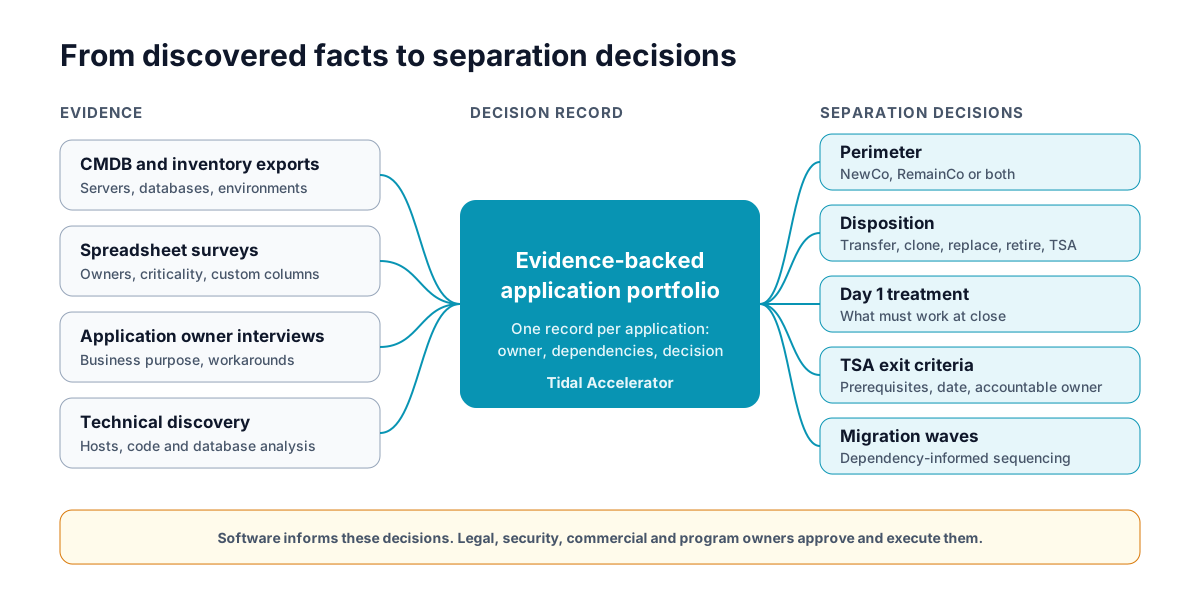
Conceptual view: evidence from several sources feeds one application portfolio record, which supports perimeter, disposition, Day 1, TSA exit and wave decisions.
Tidal Accelerator is built for this layer. Here is one path through it for Order Hub:
- Import the record. Start from the spreadsheet or CMDB export. Tidal Tools discovery can add server and database facts for the environments it is pointed at.
- Find the gap. The imported record has no business owner and no mention of the pricing feed.
- Capture the context. A structured application owner interview fills in the owner, the business process and the dependency on RemainCo pricing, which is then recorded against the application.
- Propose a decision. The team records a proposed disposition and a 6R recommendation, and places it in a migration wave with its recorded dependencies in view.
- Record who accepts it. Fields such as evidence reference, approver and approval date can be added as custom fields. Define the carve-out fields once, in the UI or through the Tidal API, and use them on every application in the portfolio. The approval itself happens in your program’s governance process. Accelerator holds the record of it.
Choose those fields as columns on the Applications list and the carve-out view sits alongside the rest of the portfolio. From Bulk Actions, export the selected applications to Excel with the columns you chose, or to a PDF report that includes the custom field values for each application.
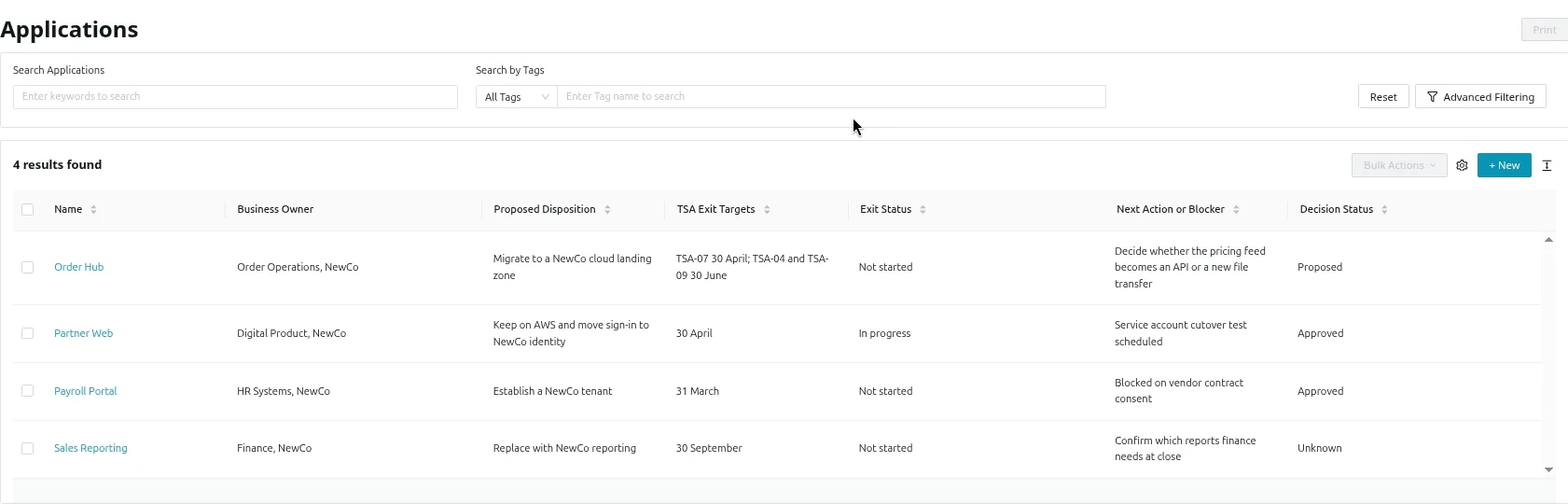
The Applications list showing carve-out custom fields as columns. The application data is fictional.
Be clear about what is imported, entered and discovered. Dependencies come from imported records, from interviews and from people entering them. Discovery adds infrastructure facts, but it does not automatically find every shared service, so treat any dependency nobody has confirmed as unverified. Cost, ROI and business case analysis sits alongside the portfolio, built on the inputs and assumptions you give it. It is a model, not a promise of savings or funding.
Accelerator does not administer TSAs, run cutovers or replace your contract tools, deal room or ITSM platform. One practical blocker comes before any of this: inventory data may be restricted by contract, data residency rules or a security review that has to approve the export. Plan for that approval early.
What does a carve-out disposition register look like?
A disposition register connects each application’s proposed future state with its Day 1 arrangement, dependencies, accountable owner and TSA exit obligations. The four applications below show how decisions move at different speeds.
Illustrative example. All applications, owners, dates, TSA identifiers and evidence references are fictional.
| Application and owner | Day 1 arrangement | Proposed disposition | TSA services and exit targets | Decision and exit status |
|---|---|---|---|---|
| Order HubOrder Operations, NewCo | Seller colocation, with identity and service desk under TSA | Migrate to a NewCo cloud landing zone |
|
Decision: ProposedExit: Not started |
| Payroll PortalHR Systems, NewCo | Seller SaaS tenant under TSA | Establish a NewCo tenant |
|
Decision: ApprovedExit: Not startedVendor consent pending |
| Sales ReportingFinance, NewCo | Seller provides a read-only extract | Replace with NewCo reporting |
|
Decision: UnknownExit: Not startedRequired reports not confirmed |
| Partner WebDigital Product, NewCo | NewCo AWS account, seller identity under TSA | Keep on AWS and move sign-in to NewCo identity |
|
Decision: ApprovedExit: In progress |
-
Order Hub
Order Operations, NewCo
- Day 1 arrangement
- Seller colocation, with identity and service desk under TSA
- Proposed disposition
- Migrate to a NewCo cloud landing zone
- TSA services and exit targets
- TSA-07 identity, 30 April
- TSA-04 hosting, 30 June
- TSA-09 service desk, 30 June
- Decision
- Proposed
- Exit
- Not started
-
Payroll Portal
HR Systems, NewCo
- Day 1 arrangement
- Seller SaaS tenant under TSA
- Proposed disposition
- Establish a NewCo tenant
- TSA services and exit targets
- TSA-12 payroll service, 31 March
- Decision
- Approved
- Exit
- Not startedVendor consent pending
-
Sales Reporting
Finance, NewCo
- Day 1 arrangement
- Seller provides a read-only extract
- Proposed disposition
- Replace with NewCo reporting
- TSA services and exit targets
- TSA-15 reporting extract, 30 September
- Decision
- Unknown
- Exit
- Not startedRequired reports not confirmed
-
Partner Web
Digital Product, NewCo
- Day 1 arrangement
- NewCo AWS account, seller identity under TSA
- Proposed disposition
- Keep on AWS and move sign-in to NewCo identity
- TSA services and exit targets
- TSA-07 identity, 30 April
- Decision
- Approved
- Exit
- In progress
Read across a row and you see one application’s position. Read down the TSA column and a different problem shows up. Order Hub and Partner Web both depend on TSA-07, the seller’s identity service. Partner Web can be ready to move its sign-in by 30 April, but the seller cannot switch TSA-07 off until Order Hub has moved too. One shared service ties two exit plans together, which is why exit dates belong to services as well as applications. The summary shows the proposed disposition and accountable owner for each application. The detailed record behind it holds the supporting evidence, outstanding actions and approval or exit status.
Two kinds of status
- Decision: Unknown, Proposed, Approved, Rework.
- Exit: Not started, In progress, Evidence complete, Exit accepted.
An approved decision means the disposition is agreed. It says nothing yet about whether the work has been built or tested. Exit is accepted only when the exit evidence is complete and the accepting party has signed it off.
Order Hub in full (fictional)
- Evidence: the dependency on the RemainCo pricing feed was confirmed in the owner interview of 14 February (reference INT-031). The identity team reviewed the identity configuration on 21 February (reference EV-112).
- Proposed disposition: migrate to a NewCo landing zone, recorded on 3 March by the application architect.
- Approval pending: the Head of Order Operations and the separation lead.
- Exit evidence required: a NewCo hosting and operating owner named, identity tested for users and service accounts, the pricing feed integration test passed, seller access removed, and the release of TSA-04, TSA-07 and TSA-09 confirmed.
- Next action: decide whether the pricing feed becomes an API or a new file transfer.
Have your separation lead and the right commercial or legal reviewer confirm what exit evidence your contracts require.
What changes for a buy-side team moving acquired applications to the cloud?
The useful question is whether to transfer an application as it is or rebuild it before its TSA services end. Transferring keeps the exit simple but carries the seller’s design forward. Rebuilding can remove a dependency, but it adds work against a fixed deadline. Staying put in the current data center, colocation facility or cloud is also a valid answer.
If you’re considering AWS as the destination for acquired applications, Tidal’s Optimization & Modernization Assessment can help identify modernization candidates and build a practical plan.
Is your carve-out ready? A one-question test
Choose a critical application. Ask its owner to show the dependencies, the Day 1 arrangement, the outstanding TSA services and the evidence behind the proposed disposition. Record any unanswered question with an owner and a next action. A slow answer can mean missing access, an absent owner or a commercial decision that has not been made yet, and each needs a different fix.
If you want to see how Tidal Accelerator organizes these records, bring a sample inventory that your security team has approved for sharing.
Related reading for the network workstream: network containers for grouping each entity’s address space, and comparing planned and live cloud networks as the separation lands.
Frequently asked questions
What software is useful for an IT carve-out?
Application portfolio assessment and dependency mapping software helps teams keep one record per application, joining inventory, ownership, dependencies and decisions. Tidal Accelerator is one example: it records application dependencies alongside ownership and decisions. Discovery tools, project tools and contract systems keep their own jobs.
Can an IT carve-out span owned data centers, colocation and several clouds?
Yes. The perimeter follows the business. Record where each application runs, and treat every dependency that crosses environments or legal entities as its own decision.
What is a TSA in an IT carve-out?
A Transition Services Agreement (TSA) is a contract in which the seller keeps providing agreed services, such as hosting, identity or support, to the divested business for a period after close. Each service is exited separately, either by the new business taking it on or by moving it to a new provider.