

The Subnet That’s Fine - Until It Isn’t
An overlapping subnet can sit quietly for years - until two networks need to connect. A duplicate CIDR (Classless Inter-Domain Routing), an IP address range such as 10.0.0.0/24, may cause you no immediate trouble while networks remain isolated. During an expansion, acquisition, or cloud migration, however, that same overlap can become a connectivity blocker.
Cloud peering is one place where the issue becomes unavoidable. AWS does not allow VPC peering between networks with matching or overlapping CIDR blocks and Azure blocks VNet peering under the same condition.
But overlapping address space isn’t automatically a mistake. In isolated routing domains, reusing a private IP range space can be deliberate and a valid design choice. The real question isn’t whether the overlap exists - it’s whether you know why it exists, and whether it could cause a problem later.
By Design, Not By Accident
Private IP addresses don’t need to be globally unique. They need to be unambiguous within the networks where traffic actually routes. Reusing a private range can be appropriate across:
- Separate VRF (virtual routing and forwarding) instances
- Isolated customer or tenant environments
- Development and lab networks that do not connect to production
- Acquired networks kept separate while their address space is reviewed
- Networks where NAT (network address translation) is already part of the connectivity design
Two zones can both contain 10.0.0.0/24 without any immediate conflict. The IP range alone won’t tell you whether the design is safe, you also need the zone, routing context, environment, and owner.
The Moment It Becomes a Problem
The risk appears when previously separate networks need to communicate. Overlapping address ranges can:
- Complicate hybrid connectivity through VPN, AWS Direct Connect, or Azure ExpressRoute
- Create routing ambiguity between business units, branches, or cloud environments
- Delay network consolidation after a merger or acquisition
Catch the overlap late, and you may need to renumber workloads, introduce NAT, or redesign routing before connectivity can move forward. Catch it during planning, and you keep your options open.
You can use the LightMesh Subnet Planner to design CIDR address space visually before deployment - no account required. The planner validates child blocks against the parent range and other planned subnets as you work.
When you save a plan to LightMesh, planned subnets can be reconciled with live AWS, Azure, and discovered network data. This helps you identify potential overlaps before provisioning a VPC or VNet.
LightMesh’s Approach: A Warning, Not a Wall
LightMesh gives you a source of network truth across on-premises, cloud, and segmented environments, organized through Sites, Zones, Subnets, and IP assignments.
Zones represent logical network segments, and subnets stay unique within each Zone - not across all of them. That distinction is what lets LightMesh treat overlap as normal instead of flagging every duplicate CIDR as an error.
Create a subnet with a CIDR that already exists elsewhere, and LightMesh flags it. A warning naming the Zone or Zones where it already lives appears. You can still create the subnet in a different Zone when the overlap is intentional - the warning confirms you meant to do it.
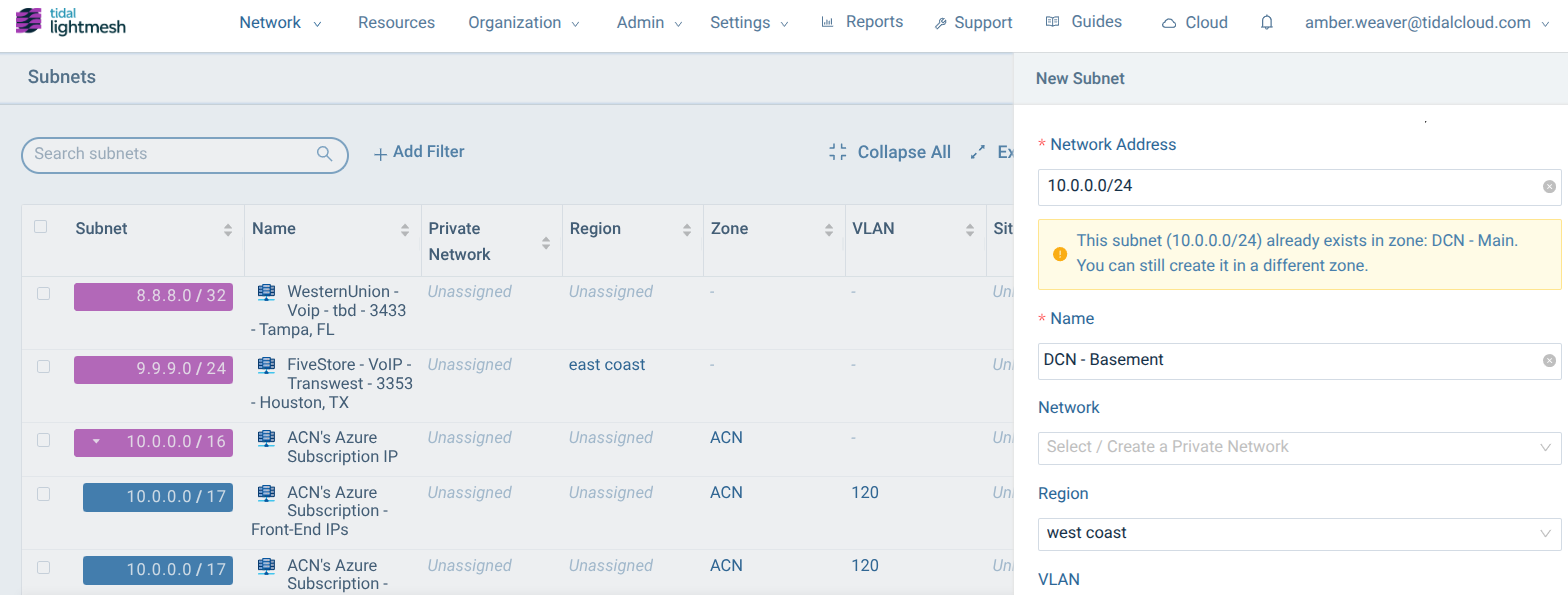
Duplicate subnet warning showing the Zones where the CIDR already exists.
The warning is a checkpoint, not a wall: it helps you catch unintended overlap without preventing valid address reuse across isolated networks.
Keep the Flexibility. Make the Overlap Deliberate.
Every duplicate CIDR should have a clear answer: where it exists, why it was reused, and whether it could create a future conflict. LightMesh gives you the context to preserve intentional overlap, identify real risks, and plan future connectivity with confidence.
Step 1 - Plan before deployment. Use the LightMesh Subnet Planner to design and validate your address space for free, no account required.
Step 2 - Put your plan into action. Start free with LightMesh to save your plan and manage those subnets through the full IPAM lifecycle.